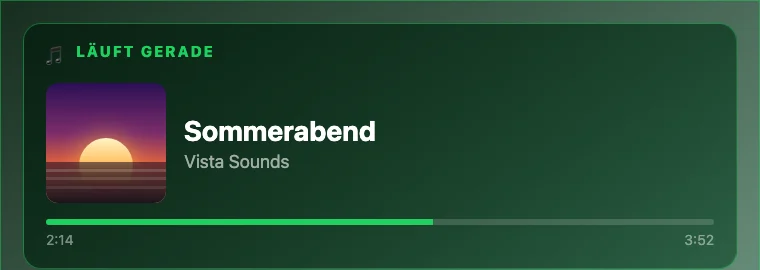
Why this works on Pinterest
Concrete benefit instead of product name.People are more likely to click “music on the wall” than a generic software message.
Instantly understandable visual.Cover art, title and progress bar explain the feature without technical text.
Fits daily life.Music, calendar, weather and photos belong together in a kitchen, living room, office or hobby room.
What Vista-Board shows
- Cover art, title and artist of the currently playing Spotify track
- Playback progress as a subtle music tile
- Calendar, weather, photos, news and optional solar/energy data on the same board
- The music tile appears only while something is playing and disappears afterwards
- Raspberry Pi, Linux mini PC or an existing display in browser mode
Who this is for
| Use case | Benefit |
|---|---|
| Family kitchen | Calendar, weather, photos and the current music on a calm display. |
| Living room or hobby room | A clean now-playing board that also shows appointments and weather. |
| Smart-home setup | Make music, solar data, electricity prices, wallbox and sensors visible in one place. |
When it is not the right fit
- If you use Spotify Free — the feature requires Premium.
- If you do not want to create your own Spotify developer credentials.
- If you only want to control music. Vista-Board is a wall dashboard, not a dedicated music remote.
FAQ
Can Vista-Board control Spotify?
Vista-Board shows what is currently playing: cover art, title, artist and progress. It is meant as a wall display, not as a full Spotify remote control.
Do I need Spotify Premium?
Yes. The now-playing display requires Spotify Premium and your own credentials through the Spotify Developer Dashboard.
Do the Spotify credentials stay local?
Yes. The credentials are stored in your Vista-Board installation and are not sent to a Vista-Board cloud service.
Try the music wall display in the real board
Try it for 30 days without payment details. If setup gets stuck, that feedback is useful — it helps improve the guide.